 MetaKraftwerk

Database Deployment
Purpose: Direct deployment of database objects and scripts to target database systems
Key Features:
- Multi-Platform Support: Support for various database systems (Snowflake, Oracle, SQL Server, PostgreSQL, etc.)
- Schema Management: Automated schema creation and updates
- Script Execution: Automated execution of SQL scripts and procedures
- Connection Management: Secure database connection handling
Configuration Parameters:
- Target database connections
- File Deployments: Map file templates to connections
Deployment Objects Examples:
- Table creation scripts
- Stored procedures and functions
- Data migration scripts
- Index and constraint definitions
Use Cases:
- Data warehouse deployment
- Database schema updates
- General DDL Scripts
- Schema Drifts
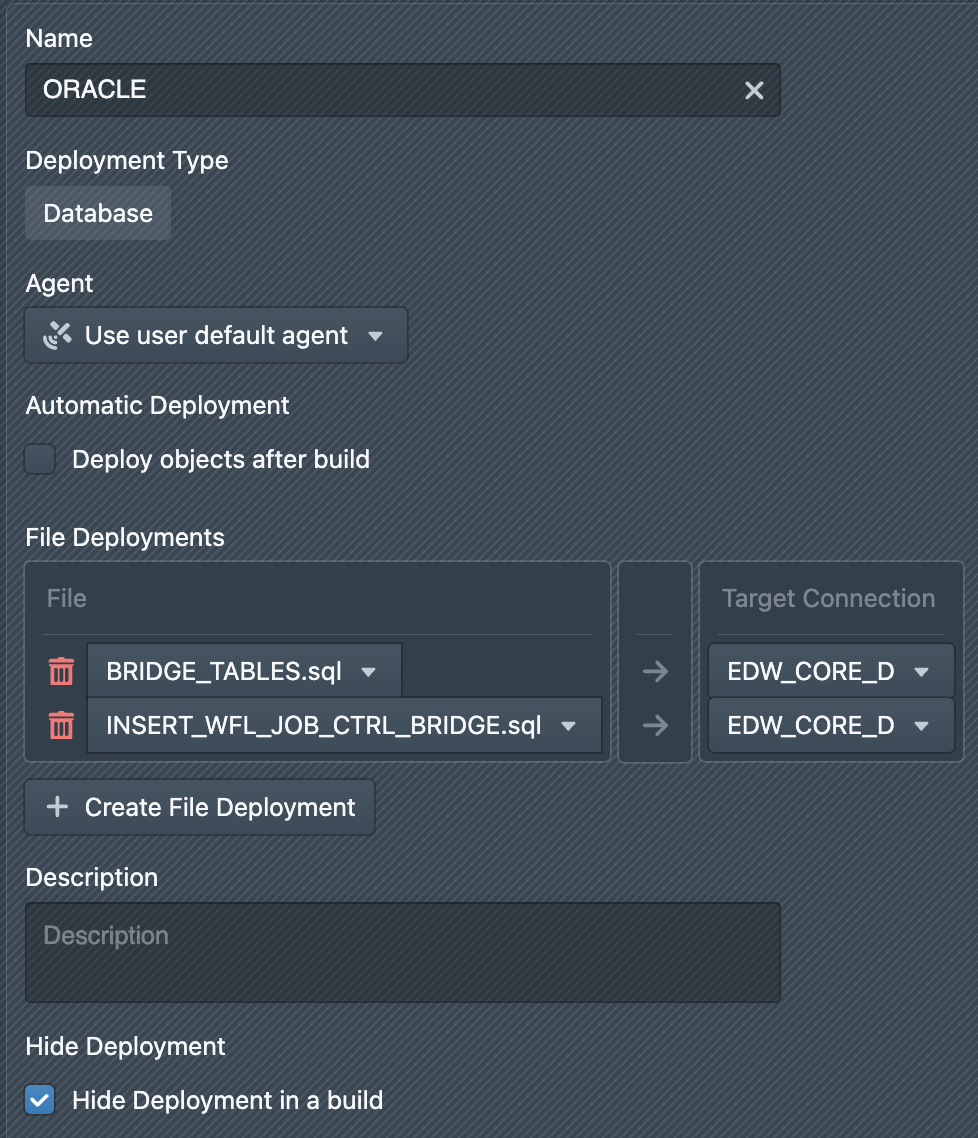
In a database deployment, you must specify which files are to be deployed using which connections. To do this, click on + Create File Deployment. A new entry appears in the list of file deployments. On the left-hand side, select the file template that is to be deployed. On the right-hand side, select the database connection via which the generated files are to be deployed. During a build, all files created using the file template are then deployed via this exact connection.