 MetaKraftwerk

File Editor
Please note
This guide is relevant for creating file templates and scripts within MetaKraftwerk patterns.
The File Editor in MetaKraftwerk enables the creation of dynamic file templates for generating associated scripts such as DDL statements, configuration files, and other deployment artifacts. These templates utilize the same metadata framework as other pattern elements, providing access to functional roles, instance properties, variables, and reusable expressions that are resolved during the build process.
For a practical walkthrough of the File Editor, watch the video below.
It explains how to navigate the editor, use dynamic metadata, and build custom file templates(SQL script and Notebook) efficiently.
Creating File Templates
To generate files from patterns, MetaKraftwerk provides the option of creating file templates within the Files section. The same metadata editor is used to create templates as for other dynamic settings of a process. You have access to functional roles and instance properties, as well as variables and reusable expressions. The file can be given either a fixed name or a dynamic naming rule. For DDL scripts, the database system can be selected so that MetaKraftwerk knows which type system is being used.
File Naming Configuration
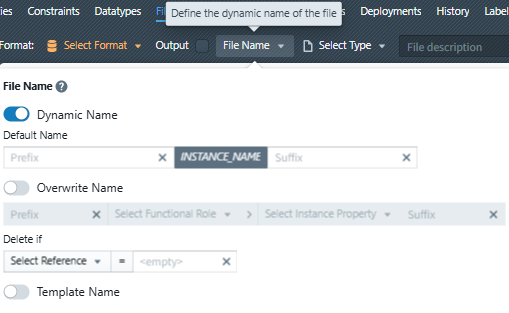 The File Editor offers flexible naming options for generated files:
 Dynamic Name
When enabled, the file name is constructed using metadata variables and expressions. You can define:
- Prefix: Static text or expressions added before the main name
- Main Name: Typically uses variables like
INSTANCE_NAME - Suffix: Static text or expressions added after the main name
Overwrite Name
This option allows you to completely replace the default naming convention with custom logic using:
- Functional roles for conditional naming
- Instance properties for environment-specific names
- Complex expressions for advanced naming patterns
Template Name
For reusable file patterns, you can define a base template name that serves as the foundation for instance-specific variations.
Content Creation and Expression Blocks
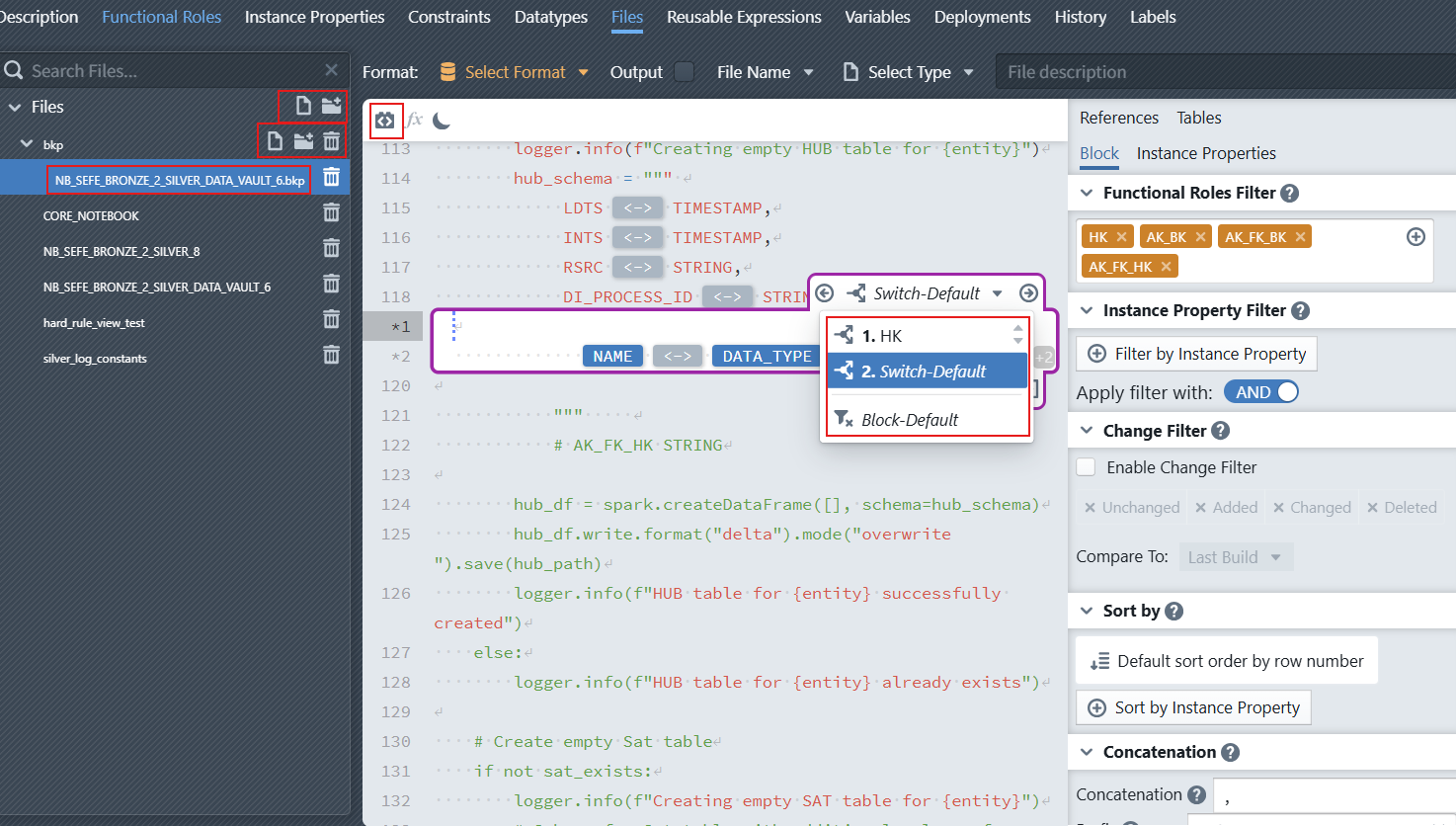 Within the file template content, you can mix static text with dynamic expression blocks. An expression block defines an insertion point where subexpressions and instance metadata should be inserted. To create a block, position the cursor at the desired location in the text editor and use the block creation functionality.
 For each block, you must define (similar to other pattern editors) which functional roles should be used or how instance metadata should be filtered based on instance properties. For each record that passes through the filter, the text expression within the block is used in the result. The developer has access to instance properties, variables, reusable expressions, and other operators that are replaced during the build process.
Advanced Block Features
Switch Cases
It is possible to define several switch cases for a block, which control which partial expression should be used for a dataset. This is useful when you need different logic based on data types or other conditions. For example, when generating DDL statements, you might need different syntax for different database systems.
A new switch case is created by adding a condition and defining the corresponding expression. You can switch between different switch cases using the block header controls. The order of switch cases can be adjusted to control evaluation priority.
Predefined Switch Cases
There are always two predefined switch cases:
- Switch-Default: Contains the expression used when no other switch case applies
- Block-Default: Contains the expression used when the block filter doesn't match any fields, which happens when selected functional roles are not present in an instance
Nested Blocks
Blocks can be nested to define more complex file structures, such as hierarchical configurations or nested SQL statements. To create a nested block, position the cursor within an existing block and create a sub-block. When working with nested blocks, you can specify join conditions to the parent block through the block settings.
File Type and Language Support
The File Editor supports multiple file types and programming languages, adapting its functionality based on the selected type: 
Notebook Files
When creating Notebook files, the editor provides:
- Python code generation with dynamic variable substitution
- Jupyter notebook JSON structure creation
- Cell-based content organization
- Metadata integration for adaptive code generation
SQL and KQL Scripts
For database-related files, the editor offers:
- SQL syntax highlighting and validation
- KQL (Kusto Query Language) support for Azure Data Explorer
- Database system selection for appropriate syntax generation
- Dynamic query construction with metadata variables
General Script Files
The editor also supports:
- Custom script formats with appropriate syntax highlighting
- Environment-specific script generation
- Dynamic parameter injection
- Multi-language code template creation
Metadata Integration
The File Editor seamlessly integrates with MetaKraftwerk's metadata system, providing access to:
Instance References
INSTANCE_NAME,INSTANCE_DESCRIPTIONBUILD_ID,BUILD_TIMESTAMP,BUILD_USER_NAMEPATTERN_NAME,PATTERN_VERSIONPROJECT_NAME,RELEASE_NAME
Reusable Expressions
- Code Blocks: Define reusable blocks of code (like markdown cells, Python functions, SQL procedures, or complex logic) that can be referenced across multiple files
- Attributes: Create reusable attribute definitions that can be dynamically inserted into file templates
- Dynamic Content: Expressions that adapt based on functional roles and instance properties
Variables
- Custom variables defined in the pattern
- Environment-specific configuration values (connections, schemas, paths)
- Dynamic calculation results
- Variables can be defined in the admin section of a pattern for reuse across files
Functional Roles
- Dynamic content generation based on metadata structure
- Filtering and conditional logic in file templates
- Reusable pattern components across different implementations
- Structured approach to metadata management
File Organization and Management
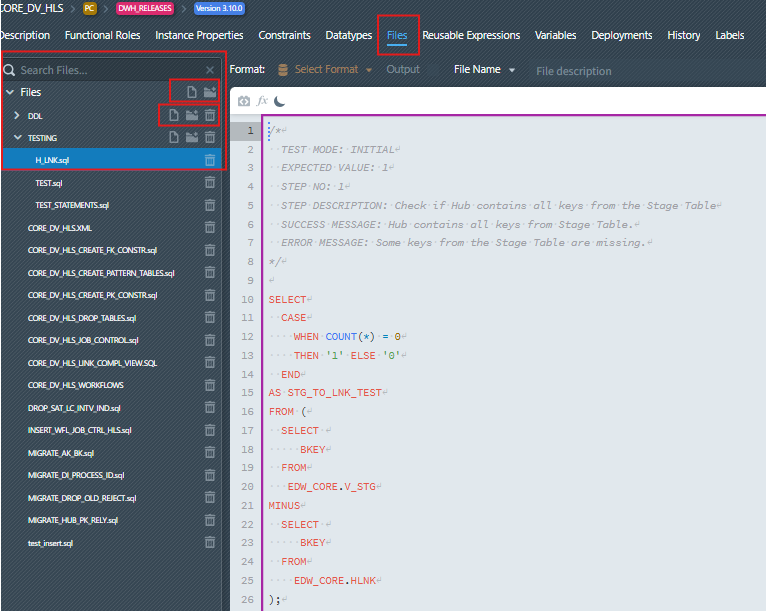
Files are organized within the pattern structure and can be categorized into folders for better organization. The file list shows:
- File hierarchy with expandable folders
- File types and formats
- Search functionality for quick navigation
- Bulk operations for file management
Common Use Cases
DDL Script Generation
Create database schema files that adapt to different environments and database systems, with dynamic table names, schema references, and system-specific syntax.
Python Notebooks (JSON)
Generate Jupyter notebook files with dynamic Python code for data processing, analysis, and ETL operations. The editor supports creating complex notebook structures with multiple cells, metadata, and executable Python code that adapts to different data sources and processing requirements.
Configuration Files
Generate environment-specific configuration files with dynamic parameters, connection strings, and feature toggles based on instance properties.
Deployment Scripts
Create automated deployment scripts that include environment-specific paths, credentials, and deployment steps.
Documentation Generation
Automatically generate documentation files that reflect the current pattern configuration, including descriptions, dependencies, and deployment instructions.
Best Practices
When creating file templates:
- Use meaningful variable names that clearly indicate their purpose
- Implement proper error handling within expressions
- Test templates with different instance configurations
- Document complex logic with comments
- Organize files logically within the pattern structure
- Use consistent naming conventions across templates
The File Editor provides a powerful mechanism for creating dynamic, reusable file templates that automatically adapt to different deployment scenarios while maintaining consistency and reducing manual configuration efforts.