 MetaKraftwerk

Instance Metadata
The instance metadata stored for each pattern in a project is made available in the meta database via views. Each pattern has a view through which the metadata of all instances of a pattern can be read. The view's schema contains the pattern's instance properties and a few technical attributes. The technical attributes include:
| Attribute | Data Type | Description |
|---|---|---|
| @PATTERN | string | The name of the pattern |
| @FOLDER | string | The folder path to the instance |
| @INSTANCE | string | The name of the instance to which the metadata belongs |
| @RELEASE | string | Name of the release in which the metadata is stored |
| @POS_NO | integer | Position number of the metadata record within the instance. Corresponds to the order of the records in the instance table |
| @DELETED | integer | A flag indicating whether the instance is deleted(1) or not(0) |
As you can see, the technical attributes have the prefix @. This is because they must be distinguished from the instance properties. Since instance properties cannot have an @ in their identifier, this ensures that they can be distinguished.
If you have enabled release management for a pattern, the @RELEASE column takes on a special meaning. If an instance exists in two releases, the instance metadata view will output both states and display the name of the corresponding release under @RELEASE. The state of the metadata is always the current working state within the respective release, i.e. the state you see when you open the instance in a release.
Note
If you want to select the technical attributes, you must enclose the name in double quotation marks ("), otherwise the @ in the name will not be interpreted correctly.
Inserting Instance Metadata
Unlike other views of the information schema, it is possible to insert data into the instance metadata views using an INSERT statement. In this case, the inserted records are grouped according to @FOLDER and @INSTANCE, and a new instance is created in the specified folder with the specified name. If an instance already exists at this location, it is overwritten, i.e. the previous instance metadata is deleted and the newly inserted instance metadata is transferred to the instance.
INSERT Syntax
INSERT INTO @INSTANCES.pattern_name (@FOLDER, @RELEASE, @INSTANCE, @POS_NO, FUNCTIONAL_ROLE, NAME, list_of_instance_properties...)
[OVERWRITE ('ROLE_1', 'ROLE_2', ...)]
[PARTIAL]
query
Arguments
pattern_name: The name of the pattern for which you want to insert the instance metadata.
column list: A list of all inserted columns. The list must at least contain the technical columns
| Column name | Description |
|---|---|
| @FOLDER | Name of the target folder of the instance |
| @RELEASE | Name of the target release |
| @INSTANCE | Name of the instance |
| @POS_NO | Position Number of the inserted metadata row inside an instance, defines the order of the metadata in an instance |
| FUNCTIONAL_ROLE | The functional role of a metadata row |
| NAME | The name of the metadata record (defines the key together with the role) |
As you can see, the instance properties FUNCTIONAL_ROLE and NAME are required in the column list. Further, the remaining instance properties of the pattern could be listed, but this list does not have to be complete.
list_of_instance_properties: The list of the instance properties for the pattern.
OVERWRITE clause (optional): An optional clause which will force an overwrite of the instance metadata. The clause could be restricted to a list of functional roles, which will restrict the overwrite to only these functional roles. The roles are listed after the OVERWRITE keyword enclosed by single quotes.
PARTIAL clause (optional): An optional clause that will trigger a partial insert.
query: A valid select statement which returns the instance metadata which should be inserted. The order of the selected expressions must match to the list of insert columns defined in the column list.
Note
Unlike a regular INSERT statement, the INSERT statement for the instance metadata view does not allow a VALUES clause instead of a SELECT clause.
Insert Merge Strategies
The behaviour of overwriting metadata can be configured individually for each functional role of the pattern. With the so-called merge strategy of a functional role, it is possible to change the behaviour when an instance is present. There are four different merge strategies:
| Merge Strategy | Behaviour |
|---|---|
| Overwrite | This is the default strategy; in this case, the metadata is overwritten. |
| Retain | If Retain is selected, the metadata rows of the previous instance that are also assigned this functional role are not overwritten but retained. The metadata rows of the inserted data set that have this functional role are ignored. |
| Merge | With this strategy, all metadata rows are inserted, but all previous rows with this functional role are also retained. If there was already an existing entry with the same key FUNCTIONAL_ROLE + NAME for a new row, the values of the newly inserted data record are adopted in this case. |
| Add New | With this strategy, only metadata rows for which there is no previous entry in the instance for the key FUNCTIONAL_ROLE + NAME are inserted. |
Below is an example illustrating the behaviour of an insert with merge strategies other than overwrite.
OVERWRITE Option
If you want to deactivate the merge strategies for an insert in order to insert an instance from scratch, you can do so with the OVERWRITE option in an INSERT statement. In this case, the merge strategy Overwrite applies to all functional roles and the instance metadata is completely overwritten.
There is an example of the OVERWRITE option below.
PARTIAL Option
Furthermore, it is possible to partially supplement an instance for individual functional roles. This can be done using the PARTIAL option. In this case, only the metadata rows of the instance whose functional roles are contained in the inserted data set are overwritten. All other metadata rows of the instance are retained. The merge strategy also applies here, i.e. if you insert rows with a functional role for which Add New is configured, the new rows are also supplemented and the previous rows remain unchanged. An INSERT PARTIAL can be used to perform an update on instance metadata. However, a dedicated UPDATE statement is not possible on the instance metadata view.
Below is an example of the PARTIAL option.
Examples
For the following examples, let us assume that we already have an instance named "ACCOUNT" in a folder named "/SRC". The corresponding pattern is called "LDG_PATTERN". The following shows the instance metadata for the instance so far:
| @POS_NO | FUNCTIONAL_ROLE | NAME | DATA_TYPE | EXPRESSION |
|---|---|---|---|---|
| 1 | SRC_TABLE | Account_Data | ||
| 2 | RELATED_TICKET | 4711 | ||
| 3 | SRC_FIELD | ACC_NAME | string | |
| 4 | SRC_FIELD | ACC_ADDRESS | string | |
| 5 | SRC_FIELD | REGISTRATION | timestamp | |
| 6 | DRV_TGT_FIELD | LOWER_NAME | string | LOWER(ACC_NAME) |
The following screenshot shows the instance in MetaKraftwerk:
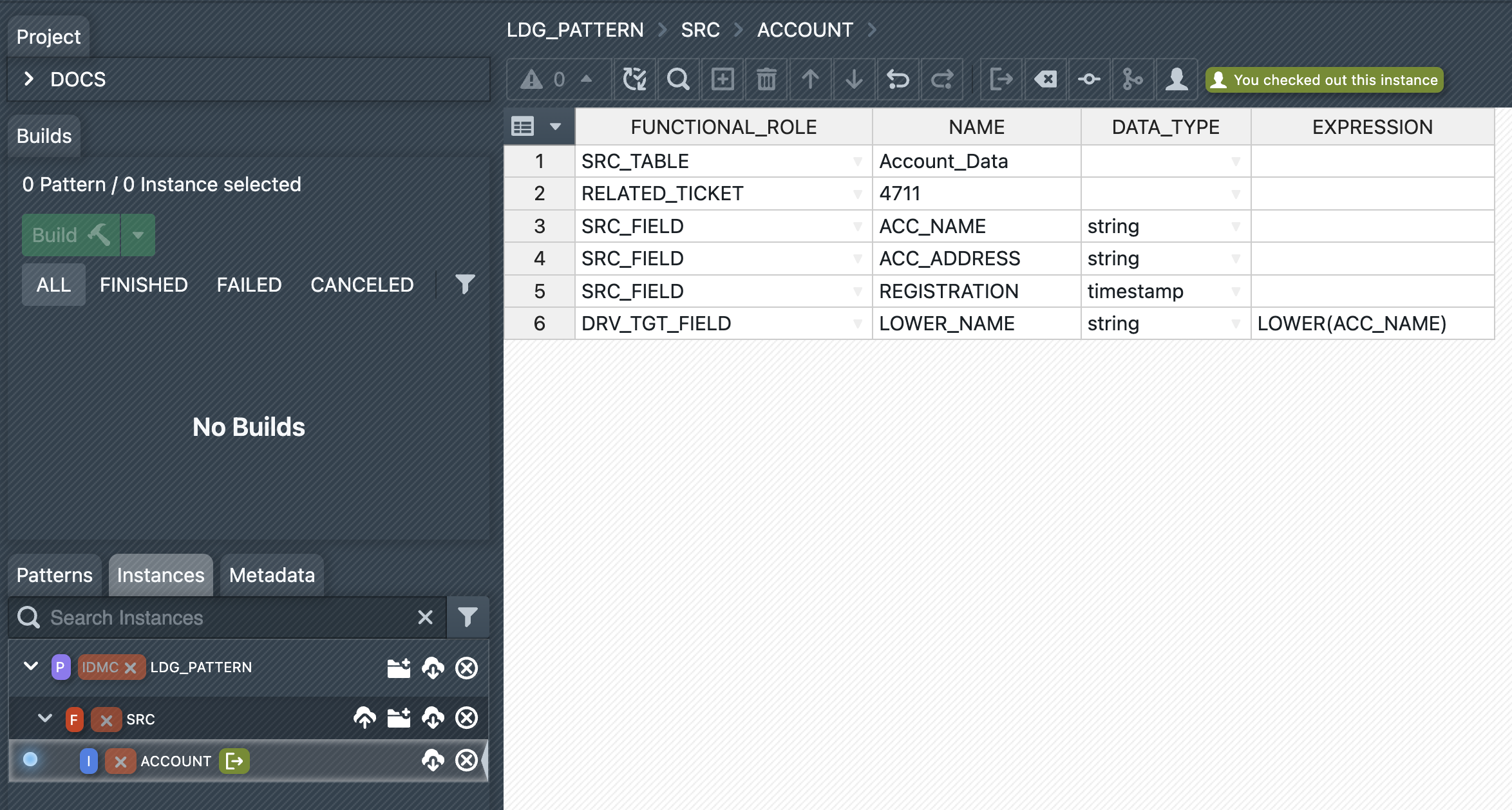
As you can see, there are four different functional roles in the instance metadata. In the example, these have the following merge strategies:
| Functional Role | Merge Strategy | Comment |
|---|---|---|
| SRC_TABLE | Retain | Once the user has defined a source table, it should be retained, even when inserting instance metadata. |
| RELATED_TICKET | Add New | Related tickets should be added so that new tickets (e.g. Jira, etc.) are added to the instance over the course of development. |
| SRC_FIELD | Overwrite | The source fields should always be completely overwritten with the new metadata. |
| DRV_TGT_FIELD | Merge | Derived target fields should be merged, i.e. new ones added and existing ones merged or retained. |
SELECT Example
The following query retrieves the instance metadata for the pattern LDG_PATTERN. Note that the technical attributes are listed in the first columns of the results. This is followed by all instance properties in the order in which they were defined in the pattern.
SELECT * FROM @INSTANCES.LDG_PATTERN
ORDER BY "@POS_NO";+-------------+---------+-----------+----------+---------+----------+-----------------+--------------+-----------+-----------------+
| @PATTERN | @FOLDER | @INSTANCE | @RELEASE | @POS_NO | @DELETED | FUNCTIONAL_ROLE | NAME | DATA_TYPE | EXPRESSION |
+-------------+---------+-----------+----------+---------+----------+-----------------+--------------+-----------+-----------------+
| LDG_PATTERN | /SRC | ACCOUNT | | 1 | 0 | SRC_TABLE | Account_Data | | |
| LDG_PATTERN | /SRC | ACCOUNT | | 2 | 0 | RELATED_TICKET | 4711 | | |
| LDG_PATTERN | /SRC | ACCOUNT | | 3 | 0 | SRC_FIELD | ACC_NAME | string | |
| LDG_PATTERN | /SRC | ACCOUNT | | 4 | 0 | SRC_FIELD | ACC_ADDRESS | string | |
| LDG_PATTERN | /SRC | ACCOUNT | | 5 | 0 | SRC_FIELD | REGISTRATION | timestamp | |
| LDG_PATTERN | /SRC | ACCOUNT | | 6 | 0 | DRV_TGT_FIELD | LOWER_NAME | string | LOWER(ACC_NAME) |
+-------------+---------+-----------+----------+---------+----------+-----------------+--------------+-----------+-----------------+INSERT Example
The following INSERT statement illustrates how you can insert new instance metadata and thus create new instances.
INSERT INTO @INSTANCES.LDG_PATTERN (@FOLDER, @INSTANCE, @RELEASE, @POS_NO, FUNCTIONAL_ROLE, NAME, DATA_TYPE, EXPRESSION)
SELECT '/SRC', 'CUSTOMER', NULL, 1, 'SRC_TABLE', 'Customers_file', '', NULL
UNION ALL
SELECT '/SRC', 'CUSTOMER', NULL, 2, 'SRC_FIELD', 'CUST_NAME', 'string', NULL
UNION ALL
SELECT '/SRC', 'CUSTOMER', NULL, 2, 'SRC_FIELD', 'EMAIL', 'string', NULL
;Inserted 3 records, merged 0 records, created 1 new instancesYou will see the above message after you execute the INSERT statement. You could check if the instance metadata was inserted by querying the instance metadata view:
SELECT * FROM @INSTANCES.LDG_PATTERN
  WHERE "@INSTANCE" = 'CUSTOMER'
ORDER BY "@POS_NO";+-------------+---------+-----------+----------+---------+----------+-----------------+----------------+-----------+-----------------+
| @PATTERN | @FOLDER | @INSTANCE | @RELEASE | @POS_NO | @DELETED | FUNCTIONAL_ROLE | NAME | DATA_TYPE | EXPRESSION |
+-------------+---------+-----------+----------+---------+----------+-----------------+----------------+-----------+-----------------+
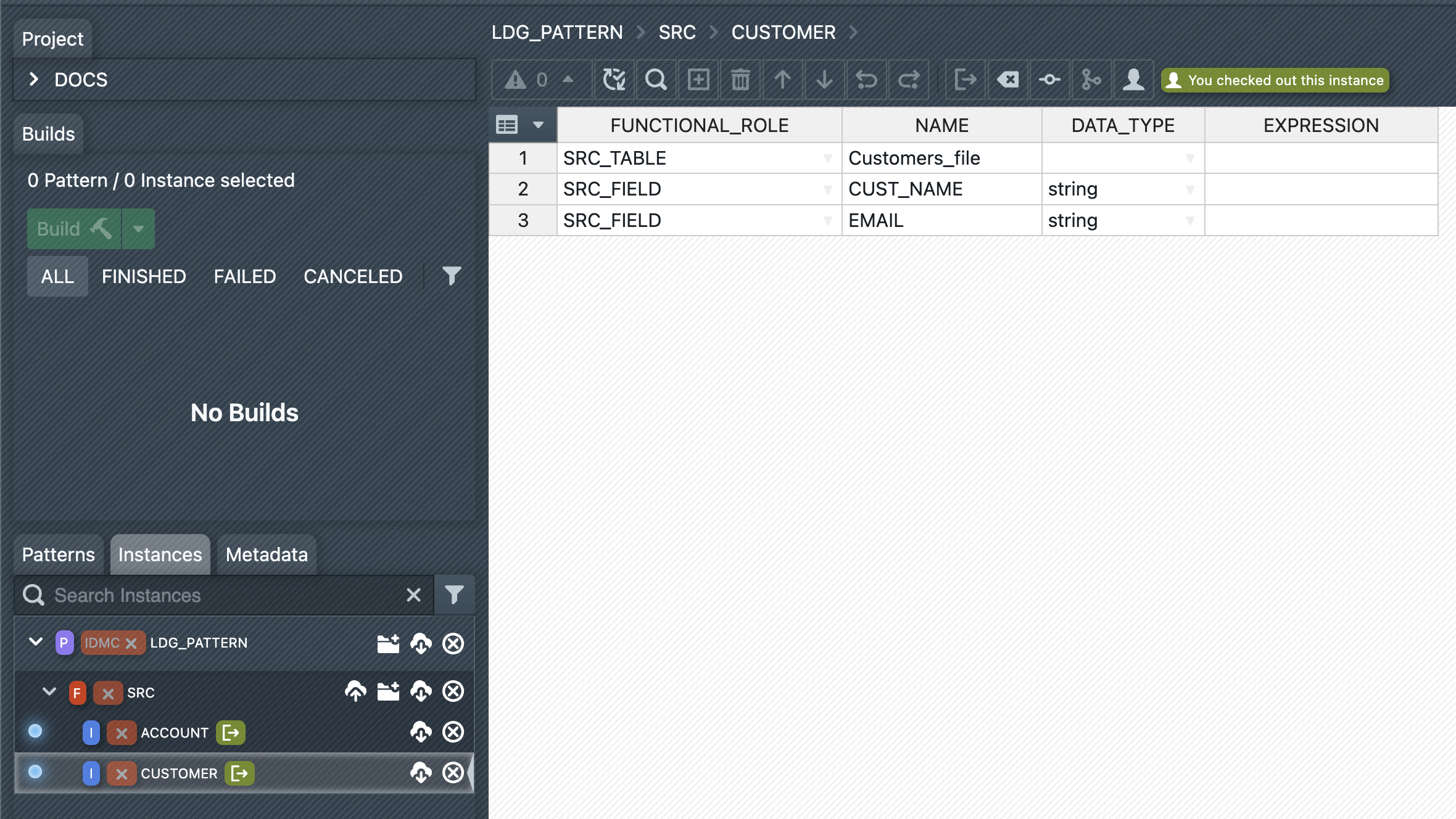
| LDG_PATTERN | /SRC | CUSTOMER | | 1 | 0 | SRC_TABLE | Customers_file | | |
| LDG_PATTERN | /SRC | CUSTOMER | | 2 | 0 | SRC_FIELD | CUST_NAME | string | |
| LDG_PATTERN | /SRC | CUSTOMER | | 3 | 0 | SRC_FIELD | EMAIL | string | |
+-------------+---------+-----------+----------+---------+----------+-----------------+----------------+-----------+-----------------+Alternatively, you can now view the instance in the UI:
INSERT with Merge Example
Below, we will show an example of an INSERT statement in which the instance "ACCOUNT" already exists (in the state it had in the SELECT example) and therefore the merge strategies come into play. This time, we will first write the metadata to be inserted into a table and select it from there instead of using the INSERT statement with a list of UNION ALL subqueries as in the last example. Therefore, the following table must first be created and filled with sample data:
CREATE TABLE MY_FOLDER.NEW_INST_MD(
  FOLDER STRING,
  INSTANCE STRING,
  POS_NO integer,
  FUNCTIONAL_ROLE STRING,
  NAME STRING,
  DATA_TYPE STRING,
  EXPRESSION STRING
);

INSERT INTO MY_FOLDER.NEW_INST_MD(FOLDER, INSTANCE, POS_NO, FUNCTIONAL_ROLE, NAME, DATA_TYPE, EXPRESSION)
VALUES ('/SRC', 'ACCOUNT', 1, 'SRC_TABLE', 'other_file', NULL, NULL)
     , ('/SRC', 'ACCOUNT', 2, 'RELATED_TICKET', '9000', NULL, NULL)
     , ('/SRC', 'ACCOUNT', 3, 'SRC_FIELD', 'ACCOUNT_ID', 'string', NULL)
     , ('/SRC', 'ACCOUNT', 4, 'SRC_FIELD', 'ACC_ADDRESS', 'string', NULL)
     , ('/SRC', 'ACCOUNT', 5, 'DRV_TGT_FIELD', 'LOWER_NAME', 'string', 'LOWER(ACCOUNT_ID)')
;
Now we execute an INSERT statement and insert the file from the table we just created:
INSERT INTO @INSTANCES.LDG_PATTERN (@FOLDER, @INSTANCE, @RELEASE, @POS_NO, FUNCTIONAL_ROLE, NAME, DATA_TYPE, EXPRESSION)
SELECT
  FOLDER
, INSTANCE
, NULL AS RELEASE
, POS_NO
, FUNCTIONAL_ROLE
, NAME
, DATA_TYPE
, EXPRESSION
FROM MY_FOLDER.NEW_INST_MD;Inserted 3 records, merged 1 records, patched 1 existing instancesFinally, we look at the current state of the "ACCOUNT" instance:
SELECT * FROM @INSTANCES.LDG_PATTERN
  WHERE "@INSTANCE" = 'ACCOUNT'
ORDER BY "@POS_NO";+-------------+---------+-----------+----------+---------+----------+-----------------+--------------+-----------+-------------------+
| @PATTERN | @FOLDER | @INSTANCE | @RELEASE | @POS_NO | @DELETED | FUNCTIONAL_ROLE | NAME | DATA_TYPE | EXPRESSION |
+-------------+---------+-----------+----------+---------+----------+-----------------+--------------+-----------+-------------------+
| LDG_PATTERN | /SRC | ACCOUNT | | 1 | 0 | SRC_TABLE | Account_Data | | |
| LDG_PATTERN | /SRC | ACCOUNT | | 2 | 0 | RELATED_TICKET | 4711 | | |
| LDG_PATTERN | /SRC | ACCOUNT | | 3 | 0 | RELATED_TICKET | 9000 | | |
| LDG_PATTERN | /SRC | ACCOUNT | | 4 | 0 | SRC_FIELD | ACCOUNT_ID | string | |
| LDG_PATTERN | /SRC | ACCOUNT | | 5 | 0 | SRC_FIELD | ACC_ADDRESS | string | |
| LDG_PATTERN | /SRC | ACCOUNT | | 6 | 0 | DRV_TGT_FIELD | LOWER_NAME | string | LOWER(ACCOUNT_ID) |
+-------------+---------+-----------+----------+---------+----------+-----------------+--------------+-----------+-------------------+Please note the following:
- The first line with the functional role
SRC_TABLEstill has the value "Account_Data", even though the inserted value was "other_file". This is because the merge strategyRetainwas selected for the functional role - A new line with the functional role
RELATED_TICKEThas been added (value 9000), but the old line with ticket number 4711 is also still there. Here you can see the effect of the merge strategyAdd New: New records are added to the existing ones - All fields with the functional role
SRC_FIELDhave been replaced. Only two rows with this role remain. This is exactly what you would expect with theOverwritemerge strategy. - The last row with the functional role
DRV_TGT_FIELDstill exists, but it has been merged, i.e. all instance properties have been overwritten with the values of the inserted data record. This is the effect of theMergemerge strategy.
INSERT OVERWRITE Example - Restriction to functional roles
Now we want to overwrite the instance "ACCOUNT" with the metadata in the table MY_FOLDER.NEW_INST_MD, thereby bypassing the merge strategies of the functional roles. However we want to overwrite all instance metadata except the records with the functional role 'RELATED_TICKET'. We do this by listing each role we want to overwrite after the OVERWRITE keyword. Please note that the roles are enclosed by single quotes, as these are just string values for the role names. As you can see we leave out the role 'RELATED_TICKET' in the list.
INSERT INTO @INSTANCES.LDG_PATTERN (@FOLDER, @INSTANCE, @RELEASE, @POS_NO, FUNCTIONAL_ROLE, NAME, DATA_TYPE, EXPRESSION)
OVERWRITE ('SRC_TABLE', 'SRC_FIELD', 'DRV_TGT_FIELD')
SELECT
  FOLDER
, INSTANCE
, NULL AS RELEASE
, POS_NO
, FUNCTIONAL_ROLE
, NAME
, DATA_TYPE
, EXPRESSION
FROM MY_FOLDER.NEW_INST_MD;Inserted 4 records, merged 0 records, patched 1 existing instancesNow let's take a look at what the instance looks like after the INSERT OVERWRITE:
SELECT * FROM @INSTANCES.LDG_PATTERN
  WHERE "@INSTANCE" = 'ACCOUNT'
ORDER BY "@POS_NO";+-------------+---------+-----------+----------+---------+----------+-----------------+--------------+-----------+-------------------+
| @PATTERN | @FOLDER | @INSTANCE | @RELEASE | @POS_NO | @DELETED | FUNCTIONAL_ROLE | NAME | DATA_TYPE | EXPRESSION |
+-------------+---------+-----------+----------+---------+----------+-----------------+--------------+-----------+-------------------+
| LDG_PATTERN | /SRC | ACCOUNT | | 1 | 0 | SRC_TABLE | other_file | | |
| LDG_PATTERN | /SRC | ACCOUNT | | 2 | 0 | RELATED_TICKET | 4711 | | |
| LDG_PATTERN | /SRC | ACCOUNT | | 3 | 0 | RELATED_TICKET | 9000 | | |
| LDG_PATTERN | /SRC | ACCOUNT | | 4 | 0 | SRC_FIELD | ACCOUNT_ID | string | |
| LDG_PATTERN | /SRC | ACCOUNT | | 5 | 0 | SRC_FIELD | ACC_ADDRESS | string | |
| LDG_PATTERN | /SRC | ACCOUNT | | 6 | 0 | DRV_TGT_FIELD | LOWER_NAME | string | LOWER(ACCOUNT_ID) |
+-------------+---------+-----------+----------+---------+----------+-----------------+--------------+-----------+-------------------+As you can see, the record with the functional role 'SRC_TABLE' has now been overwritten.
However, the records with the functional role 'RELATED_TICKET' are still both contained in the instance. We will fix this in the next example with a unrestricted overwrite.
INSERT OVERWRITE Example - Unrestricted Overwrite
In this example, we want to overwrite the entire state of the instance. In other words, we want the resulting instance to be in a state as if it had not existed before the INSERT statement. To do this, we simply add the OVERWRITE option to the INSERT statement without any restricting roles. The statement is as follows:
INSERT INTO @INSTANCES.LDG_PATTERN (@FOLDER, @INSTANCE, @RELEASE, @POS_NO, FUNCTIONAL_ROLE, NAME, DATA_TYPE, EXPRESSION)
OVERWRITE
SELECT
  FOLDER
, INSTANCE
, NULL AS RELEASE
, POS_NO
, FUNCTIONAL_ROLE
, NAME
, DATA_TYPE
, EXPRESSION
FROM MY_FOLDER.NEW_INST_MD;Inserted 5 records, merged 0 records, patched 1 existing instancesNow let's again take a look at what the instance looks like after overwriting all metadata:
SELECT * FROM @INSTANCES.LDG_PATTERN
  WHERE "@INSTANCE" = 'ACCOUNT'
ORDER BY "@POS_NO";+-------------+---------+-----------+----------+---------+----------+-----------------+--------------+-----------+-------------------+
| @PATTERN | @FOLDER | @INSTANCE | @RELEASE | @POS_NO | @DELETED | FUNCTIONAL_ROLE | NAME | DATA_TYPE | EXPRESSION |
+-------------+---------+-----------+----------+---------+----------+-----------------+--------------+-----------+-------------------+
| LDG_PATTERN | /SRC | ACCOUNT | | 1 | 0 | SRC_TABLE | other_file | | |
| LDG_PATTERN | /SRC | ACCOUNT | | 2 | 0 | RELATED_TICKET | 9000 | | |
| LDG_PATTERN | /SRC | ACCOUNT | | 3 | 0 | SRC_FIELD | ACCOUNT_ID | string | |
| LDG_PATTERN | /SRC | ACCOUNT | | 4 | 0 | SRC_FIELD | ACC_ADDRESS | string | |
| LDG_PATTERN | /SRC | ACCOUNT | | 5 | 0 | DRV_TGT_FIELD | LOWER_NAME | string | LOWER(ACCOUNT_ID) |
+-------------+---------+-----------+----------+---------+----------+-----------------+--------------+-----------+-------------------+As you can see, there is now only one data record with the functional role 'RELATED_TICKET', which is the one contained in the insert data set (NAME = 9000). The data record with the value NAME = 4711 has disappeared.
INSERT PARTIAL Example
This example shows how to do a partial INSERT of instance metadata. An instance is a set of metadata records, each with their assigned functional role. With the examples above we always operated on the whole instance. However, there may be cases where you only want to insert records with one or two selected functional roles. All records with other roles should remain untouched. This is exactly what INSERT PARTIAL is for. It allows you to make changes only to the roles that are contained in the inserted data set.
Let us assume the following data set in the table MY_FOLDER.NEW_INST_MD:
TRUNCATE TABLE MY_FOLDER.NEW_INST_MD;

INSERT INTO MY_FOLDER.NEW_INST_MD(FOLDER, INSTANCE, POS_NO, FUNCTIONAL_ROLE, NAME, DATA_TYPE, EXPRESSION)
VALUES ('/SRC', 'ACCOUNT', 1, 'SRC_TABLE', 'partial_example', NULL, NULL)
     , ('/SRC', 'ACCOUNT', 3, 'SRC_FIELD', 'ACC_PART', 'string', NULL)
;
Now we perform a partial INSERT with this data set, as follows:
INSERT INTO @INSTANCES.LDG_PATTERN (@FOLDER, @INSTANCE, @RELEASE, @POS_NO, FUNCTIONAL_ROLE, NAME, DATA_TYPE, EXPRESSION)
PARTIAL
SELECT
  FOLDER
, INSTANCE
, NULL AS RELEASE
, POS_NO
, FUNCTIONAL_ROLE
, NAME
, DATA_TYPE
, EXPRESSION
FROM MY_FOLDER.NEW_INST_MD;Inserted 1 records, merged 0 records, patched 1 existing instancesNow let's again take a look at what the instance looks like after the partial INSERT:
SELECT * FROM @INSTANCES.LDG_PATTERN
  WHERE "@INSTANCE" = 'ACCOUNT'
ORDER BY "@POS_NO";+-------------+---------+-----------+----------+---------+----------+-----------------+--------------+-----------+-------------------+
| @PATTERN | @FOLDER | @INSTANCE | @RELEASE | @POS_NO | @DELETED | FUNCTIONAL_ROLE | NAME | DATA_TYPE | EXPRESSION |
+-------------+---------+-----------+----------+---------+----------+-----------------+--------------+-----------+-------------------+
| LDG_PATTERN | /SRC | ACCOUNT | | 1 | 0 | SRC_TABLE | other_file | | |
| LDG_PATTERN | /SRC | ACCOUNT | | 2 | 0 | RELATED_TICKET | 9000 | | |
| LDG_PATTERN | /SRC | ACCOUNT | | 3 | 0 | SRC_FIELD | ACC_PART | string | |
| LDG_PATTERN | /SRC | ACCOUNT | | 4 | 0 | DRV_TGT_FIELD | LOWER_NAME | string | LOWER(ACCOUNT_ID) |
+-------------+---------+-----------+----------+---------+----------+-----------------+--------------+-----------+-------------------+As you can see, the two records with the role 'SRC_FIELD' are replaced with only one record from the insert set.
The first record with the role 'SRC_TABLE' remains unchanged. This is because the role has the merge strategy 'Retain'. It is possible to combine PARTIAL and OVERWRITE to overwrite this record with a partial INSERT. This is done in the following example.
INSERT OVERWRITE PARTIAL Example
The following example combines the OVERWRITE and PARTIAL options:
INSERT INTO @INSTANCES.LDG_PATTERN (@FOLDER, @INSTANCE, @RELEASE, @POS_NO, FUNCTIONAL_ROLE, NAME, DATA_TYPE, EXPRESSION)
OVERWRITE PARTIAL
SELECT
  FOLDER
, INSTANCE
, NULL AS RELEASE
, POS_NO
, FUNCTIONAL_ROLE
, NAME
, DATA_TYPE
, EXPRESSION
FROM MY_FOLDER.NEW_INST_MD;Inserted 2 records, merged 0 records, patched 1 existing instancesThe result of a INSERT statement with both OVERWRITE and PARTIAL options:
SELECT * FROM @INSTANCES.LDG_PATTERN
  WHERE "@INSTANCE" = 'ACCOUNT'
ORDER BY "@POS_NO";+-------------+---------+-----------+----------+---------+----------+-----------------+-----------------+-----------+-------------------+
| @PATTERN | @FOLDER | @INSTANCE | @RELEASE | @POS_NO | @DELETED | FUNCTIONAL_ROLE | NAME | DATA_TYPE | EXPRESSION |
+-------------+---------+-----------+----------+---------+----------+-----------------+-----------------+-----------+-------------------+
| LDG_PATTERN | /SRC | ACCOUNT | | 1 | 0 | SRC_TABLE | partial_example | | |
| LDG_PATTERN | /SRC | ACCOUNT | | 2 | 0 | RELATED_TICKET | 9000 | | |
| LDG_PATTERN | /SRC | ACCOUNT | | 3 | 0 | SRC_FIELD | ACC_PART | string | |
| LDG_PATTERN | /SRC | ACCOUNT | | 4 | 0 | DRV_TGT_FIELD | LOWER_NAME | string | LOWER(ACCOUNT_ID) |
+-------------+---------+-----------+----------+---------+----------+-----------------+-----------------+-----------+-------------------+