MetaKraftwerk

Port Editor
Please note
This guide is only relevant for developing ETL patterns with Informatica, Synapse or Fabric.
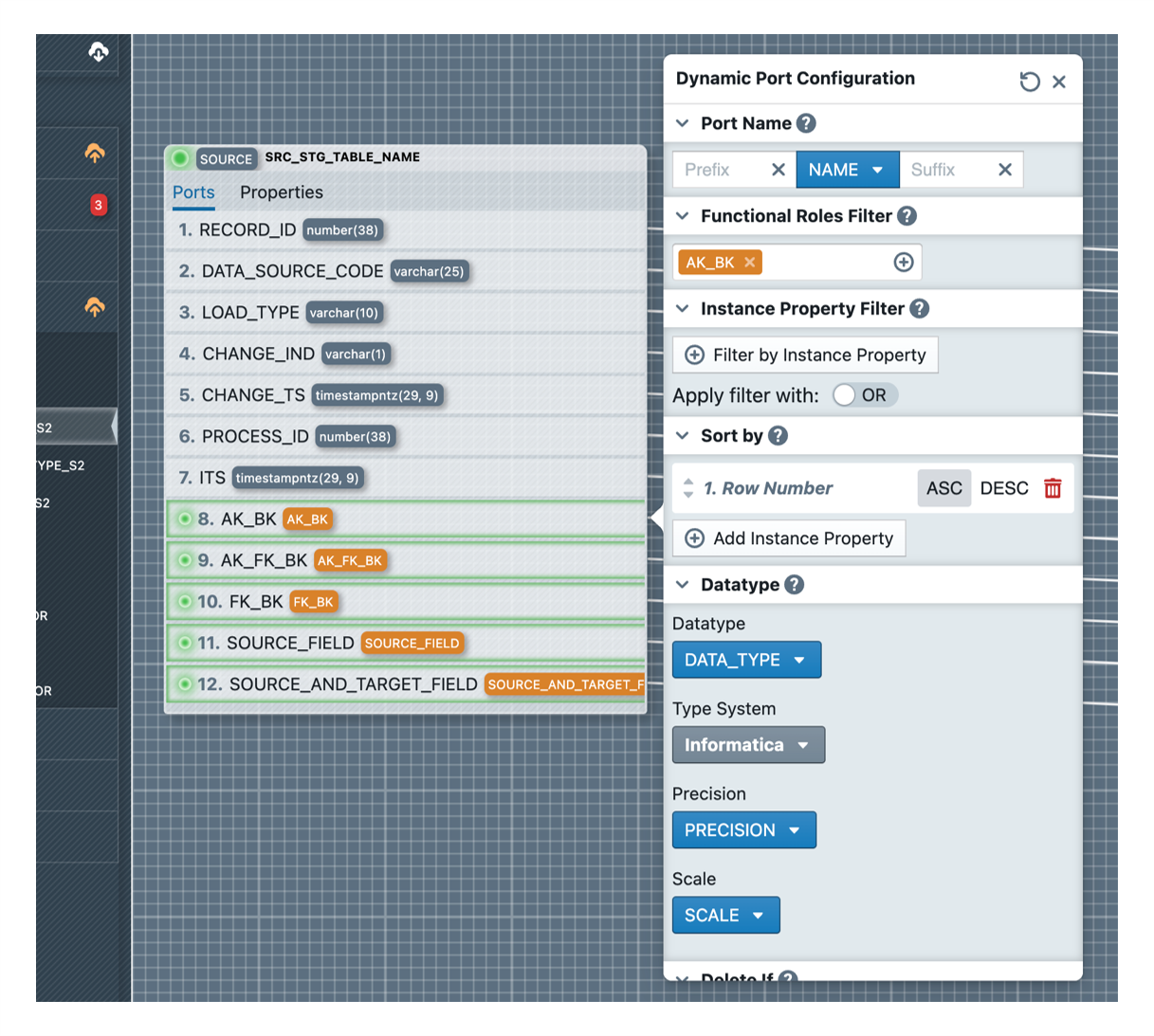
To dynamize ports in a mapping there is the Port Editor. This opens when you click on a port within a transformation. However, it does not open for ports of type Input, since these are replaced by a substitution upstream in the mapping.
In the Port Editor, the naming rule for the ports used must first be defined, consisting of prefix, instance property and suffix. Then it must be selected which functional roles are to be considered. Only the fields of an instance that are assigned to this corresponding functional role are used. Optionally, these can also be filtered further in the "Instance Property Filter" section, where any condition can be defined that must apply to a field.
The order of the fields can be defined in the "Sort By" section, based on instance properties. In addition, in the "Datatype" section it is necessary to define how the data type of the field should be determined.
Similar to other objects, an optional Delete Rule can also be defined, upon which the placeholder will simply be deleted.