 MetaKraftwerk

Reusable Expression Editor
Please note
This guide is relevant for creating reusable expressions within MetaKraftwerk patterns to eliminate code duplication and improve maintainability.
The Reusable Expression Editor in MetaKraftwerk enables the creation of dynamic, reusable metadata expressions that can be referenced throughout a pattern. When developing complex patterns, it's common for certain expressions to be used multiple times across different components such as processes, files, constraints, and configurations. Rather than repeating the same metadata expression in each location, reusable expressions provide a centralized way to define, maintain, and reference common logic.
Purpose and Benefits
Eliminating Code Duplication
During pattern development, the same metadata expressions often need to be applied in multiple locations. For example:
- Database connection strings used across multiple processes
- Naming conventions applied to various artifacts
- Complex filtering logic used in different contexts
- Common transformation expressions for data processing
Without reusable expressions, these would need to be manually maintained in each location, leading to:
- Increased development time
- Higher risk of inconsistencies
- Difficult maintenance when logic changes
- Potential errors from manual copy-paste operations
Centralized Logic Management
Reusable expressions provide a single source of truth for common logic, enabling:
- Consistency: Ensures the same logic is applied uniformly across the pattern
- Maintainability: Changes need to be made in only one location
- Reusability: Expressions can be used across different pattern components
- Testability: Complex logic can be isolated and tested independently
How Reusable Expressions Work
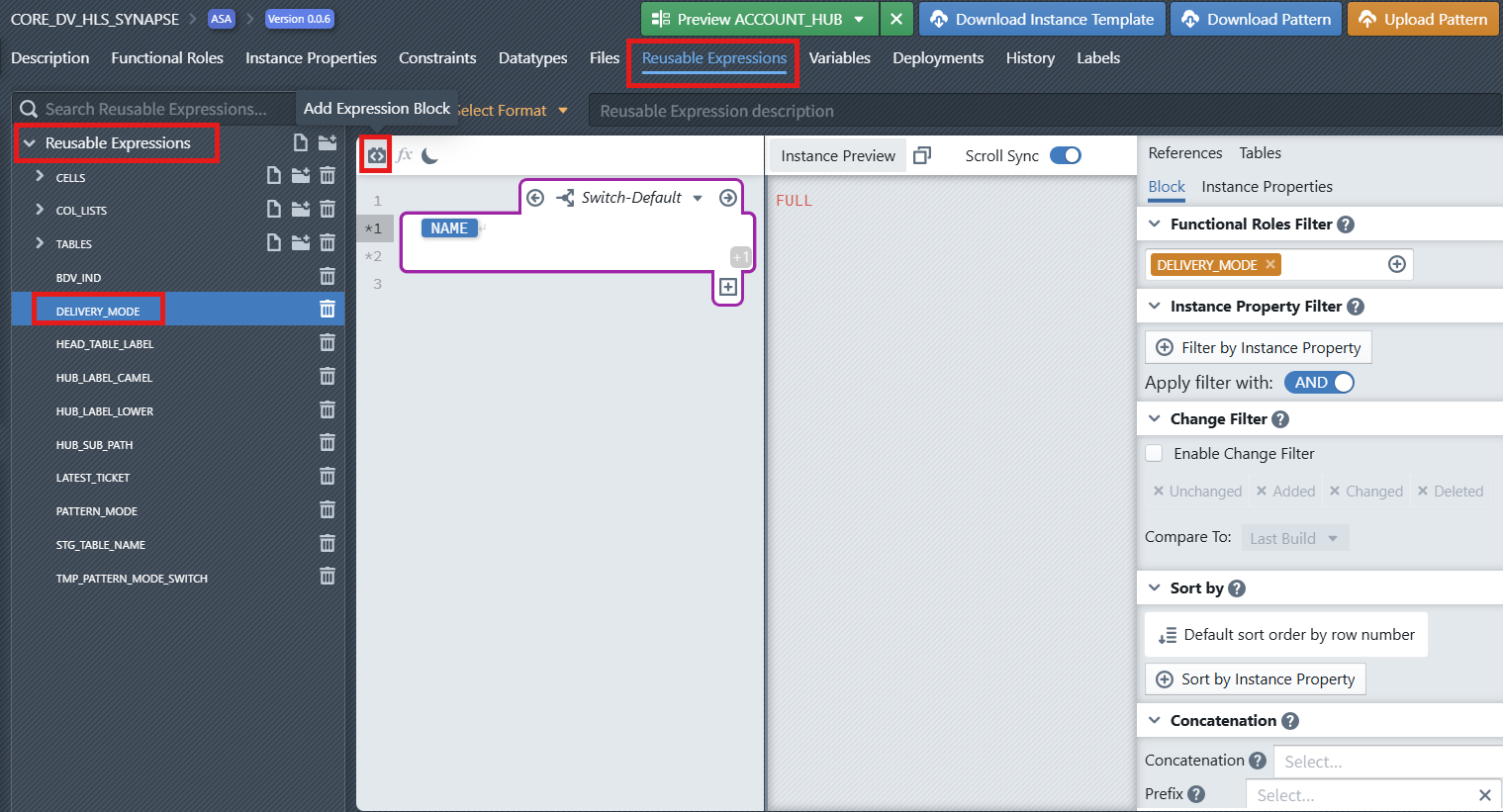
Creation Process
Reusable expressions are developed using the same metadata editor framework as file templates and other pattern elements. This provides access to:
- Functional Roles: For dynamic content generation based on metadata structure
- Instance Properties: For environment-specific and configuration-driven logic
- Variables: Custom variables defined within the pattern
- Built-in References: System-provided metadata like
INSTANCE_NAME,BUILD_ID, etc.
Expression Development
The development process follows these key principles:
- Define the Expression Logic: Use the metadata editor to create the expression using available variables, functional roles, and instance properties
- Configure Parameters: Set up any input parameters that make the expression flexible and reusable
- Test and Validate: Ensure the expression produces the expected output across different scenarios
- Document Purpose: Provide clear descriptions for future reference and team collaboration
Integration with Pattern Components
Once created, reusable expressions appear as purple placeholders throughout the metadata editor in other pattern components. This visual distinction makes it easy to identify where reusable expressions are being referenced.
Advanced Features
Expression Blocks and Switch Cases
Similar to the File Editor, reusable expressions support:
- Expression Blocks: Define insertion points for dynamic content
- Switch Cases: Conditional logic based on data types or other conditions
- Nested Logic: Complex hierarchical expression structures
- Default Cases: Fallback logic when conditions aren't met
Metadata Integration
Reusable expressions have full access to MetaKraftwerk's metadata system:
Instance References
INSTANCE_NAME,INSTANCE_DESCRIPTIONBUILD_ID,BUILD_TIMESTAMP,BUILD_USER_NAMEPATTERN_NAME,PATTERN_VERSIONPROJECT_NAME,RELEASE_NAME
Dynamic Variables
- Pattern-specific variables
- Environment configuration values
- Calculated results from other expressions
- User-defined custom variables
Functional Role Integration
- Filter content based on metadata structure
- Apply different logic for different functional roles
- Create adaptive expressions that respond to pattern variations
Usage Patterns and Best Practices
Development Guidelines
Expression Design
- Keep expressions focused: Each reusable expression should serve a single, well-defined purpose
- Use meaningful names: Choose descriptive names that clearly indicate the expression's function
- Document parameters: Clearly describe any input parameters and their expected values
- Handle edge cases: Include appropriate default values and error handling
Maintenance Practices
- Version control: Track changes to reusable expressions as part of pattern versioning
- Impact analysis: Before modifying an expression, identify all locations where it's used
- Testing: Validate expressions across different instance configurations
- Documentation: Maintain clear descriptions and usage examples
Performance Considerations
- Optimize complex logic: Break down complex expressions into smaller, more manageable components
- Cache results: For expensive operations, consider if results can be cached
- Minimize dependencies: Reduce coupling between expressions where possible
Visual Identification and Navigation
Purple Placeholders
When reusable expressions are referenced in other parts of the pattern, they appear as distinctive purple placeholders. This visual cue helps developers:
- Quickly identify where reusable logic is being applied
- Distinguish between inline expressions and reusable references
Expression Browser
The left panel provides a hierarchical view of all reusable expressions, organized by:
- Categories: Logical groupings of related expressions
- Alphabetical listing: For quick navigation
- Search functionality: To locate specific expressions
Troubleshooting and Debugging
Common Issues
- Circular references: Avoid expressions that reference themselves directly or indirectly
- Missing dependencies: Ensure all required variables and functional roles are available
- Type mismatches: Verify that expression outputs match expected data types
- Environment variations: Test expressions across different deployment environments
Debugging Techniques
- Incremental testing: Build complex expressions step by step
- Isolation testing: Test expressions independently before integration
- Logging and tracing: Use built-in debugging features to track expression evaluation
- Validation checks: Implement checks to verify expression results
The Reusable Expression Editor provides a powerful mechanism for creating maintainable, consistent patterns by eliminating code duplication and centralizing common logic. By following best practices and leveraging the full capabilities of the metadata framework, developers can create robust, scalable patterns that are easier to maintain and evolve over time.