 MetaKraftwerk

How to create a Pattern?
To start developing a pattern, you first need to create a new pattern.
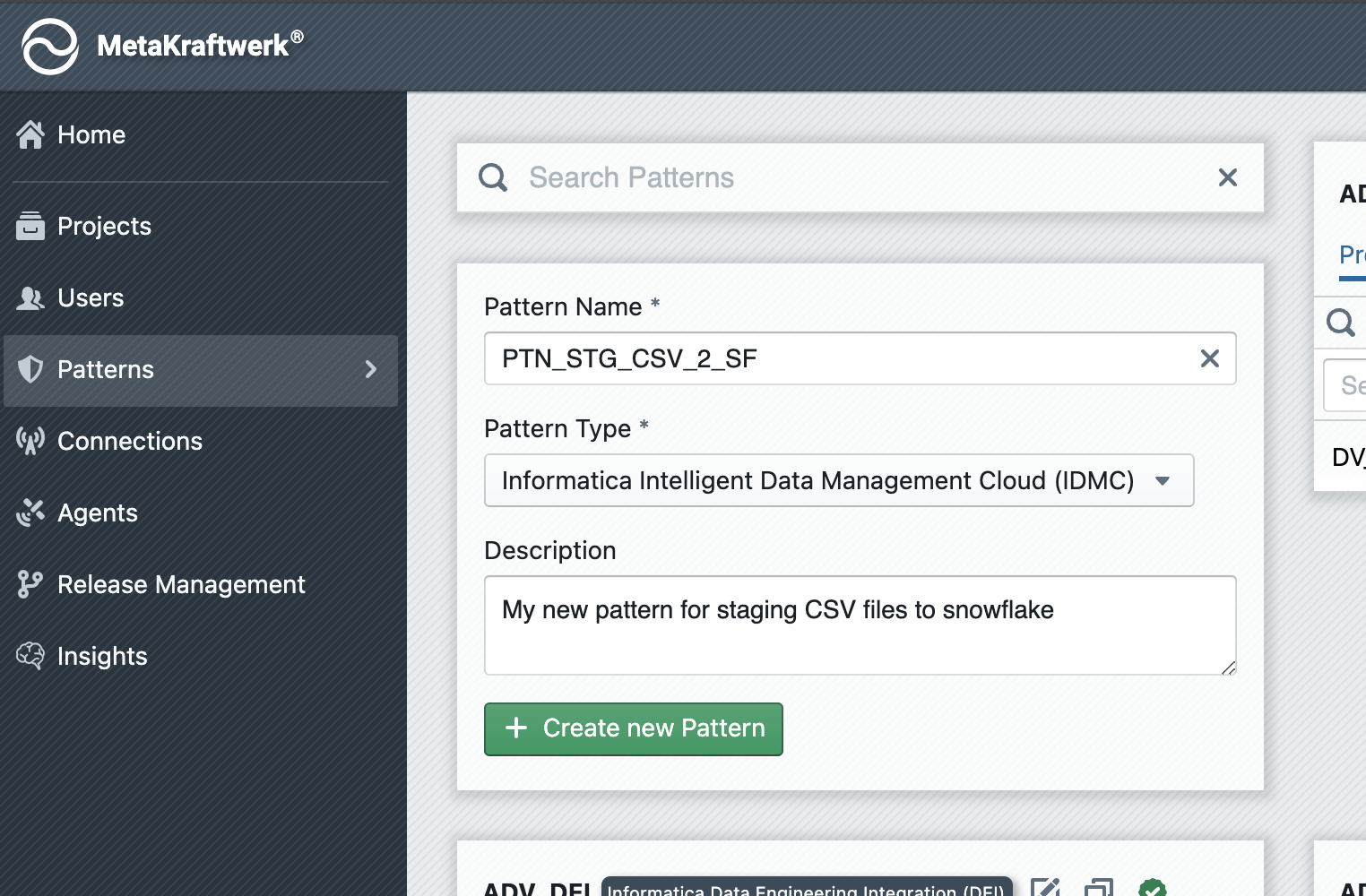
To do this, go to the Home area of MetaKraftwerk (click on the MetaKraftwerk logo at the top left) and then to the "Patterns" section (If you cannot see the "Patterns" section, please ask your admin to grant you the permissions).
You will now see the list of all previously created patterns. In the second tile under the search bar, you can create a new pattern.
Enter the name of the new pattern, select the type (see the Integrations section) of the new pattern, and then click + Create new Pattern.
The pattern will now appear in the list of existing patterns (inside your organization). However, it is not yet available in any project.
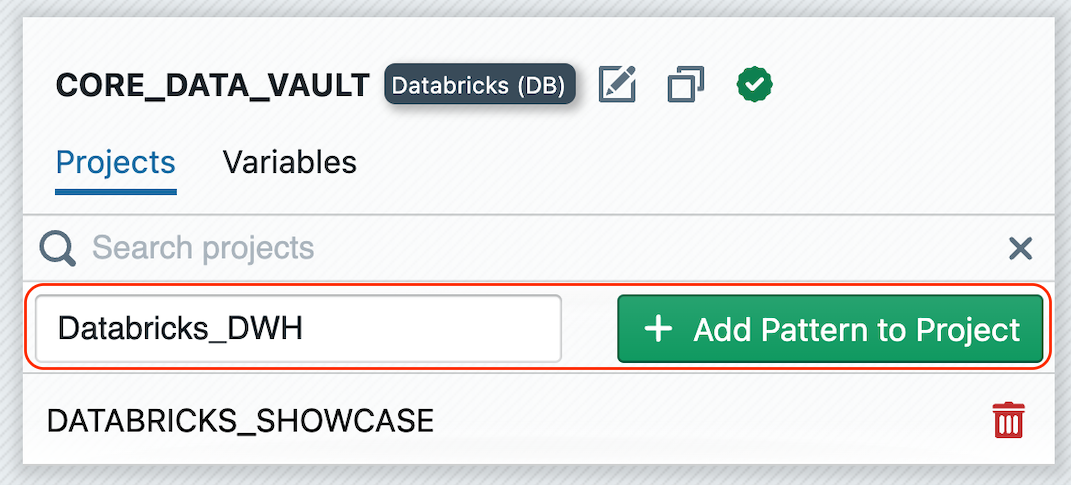
You need to add the pattern to a project first by clicking on "Search..." in the "Projects" tab on the pattern tile, selecting your desired project, and then clicking + Add Pattern to Project.
Now switch back to the project by selecting the project from the dropdown menu in the top-right menu bar. You should now see the pattern in the left sidebar under "Patterns".
More about Pattern definition.
What should you pay attention to when developing patterns?
A pattern is the combination of one or more process templates (mappings, data structures, workflows, etc.) and metadata (functional roles and instance properties). To make a pattern operational and reusable, the following aspects are important during development and administration:
1. Basic pattern metadata
- Name: Choose a clear, descriptive and unique pattern name that indicates the purpose of the pattern (e.g.
Landing_Oracle,DM_Dimension,Core_Data_Vault). - Type: Select the correct type (IDMC, Synapse, Snowflake, PowerCenter, etc.). The type determines expected templates and metadata import/export behaviour.
- Description: Provide a short description explaining the intended use and any constraints.
2. Projects and scope
- Assign to projects: Add the pattern to each project that should be able to use it. Patterns can be shared across multiple projects for standardisation.
- Project parameterization: Pattern variables can be set individually for each project. This allows you to parameterize the pattern project-specifically.
3. Templates and parameterisation
- File templates: Provide DDL, SQL, shell scripts or tool-specific export templates with clear placeholders for instance metadata.
- Mapping/pipeline templates: Keep mappings or pipeline templates parameterised (connection names, schema/table names, column mappings, batch sizes, schedule, error handling behaviour).
- Explicit placeholders: Use consistent placeholder naming and document them (e.g.
${SRC_SCHEMA},${TARGET_TABLE},${BATCH_WINDOW}) so automatic substitution is reliable.
4. Export / Import expectations
- Export format: Document the expected export format from the development platform (IDMC Export Package, PowerCenter Export XML, Synapse Support Files, etc.).
- Import behaviour: Ensure exports are consistent and that MetaKraftwerk is able to parse and convert the metadata into the internal template representation.
5. Testing and verification
- Local testing: Test the pattern instantiation locally (generate artifacts and run them in a dev instance of the target platform) before using the pattern for production.
- Automated checks: If possible, include CI in your CI/CD pipeline checks that verify generated DDLs, dependency graphs, and required properties.
6. Versioning and change management
- Version patterns: Keep track of pattern versions via the built-in versioning mechanism. When you upload a changed export file from your target platform, a new version will be created automatically. Alternatively you can click on "Commit Pattern" to create a new commit. When changing placeholders or behaviour, increment the version and document migration steps.
- Backward compatibility: When updating a pattern, assess impact on existing instances and provide migration scripts or guidance.
7. Documentation and examples
- Examples: Provide at least one complete example instance metadata file and the resulting generated artifacts so users can quickly verify and understand the pattern.
- Guides: Add usage guides (how to instantiate, required properties, troubleshooting tips) to the pattern's documentation page.
8. Security and access
- Secrets: Do not store credentials or secrets in instance metadata; use connection references that point to secure vaults or platform-managed connection objects.
- Permissions: Ensure only authorized users can edit patterns.